From observation to player file.
SPOTR works on every scout’s smartphone. Large choices, a consistent structure and offline use keep attention on the match — and the head scout finds every observation in one place.
- ±30 sper observation, pitchside
- Offlinerecord without signal
- 1file per player
Everything a scout needs, on their phone.
From the assignment to the last report of the day: the scout works in one app, with large buttons and no typing afterwards.
- Your assignment, with the head scout’s points of attention
- What you are working on and what is left to finish
- An email for each new assignment, a reminder the evening before
- Assessment per position, with detailed items if you want
- Dictate the comment instead of typing it
- Paste the squad list or photograph the team sheet
- Teams as buttons, players as small tiles
- A shirt number and a trait are enough
- Shortlist: the top ten by potential
- Your matches of the day, with kick-off, pitch and what to watch for
- One tap: the team is ready to report on
- Follow a match yourself: tap it in the schedule
- Added by yourself or by the head scout
- Preparation: the best-known players per team
- Finish match shows what is still open
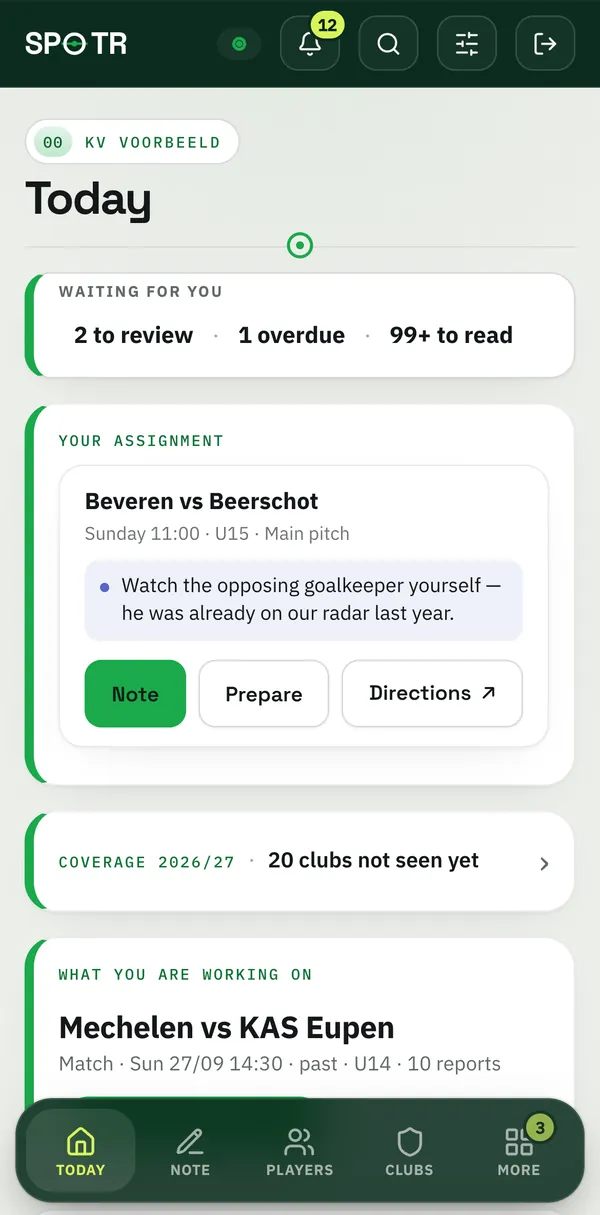
Real product screens from the SPOTR demo environment. The players, scouts and reports are made up.
See what is waiting, who goes where and who keeps up.
The head scout section of SPOTR puts your week on one screen: what to review, which matches have no scout yet and how active your scouts are.


Waiting for you
Reports to review, overdue assignments, requests and invitations on one card. Below it, you see for each scout how many reports they wrote every week.
- Overdue? Remind sends an email or prepares a message for WhatsApp
- Each scout’s activity, week by week
- Nothing to do? The card says so
Read and give feedback
Every new report per scout, with what has been filled in at a glance. Read them, give a compliment or ask for more.
- Strong: a compliment in one tap
- Ask to add when something is missing
- Reports from a scout on trial: review first, then release
Who goes where
The matches of the next seven days against your scouts, up to twelve weeks ahead. An empty cell becomes an assignment in one tap.
- Matches without a scout stand out
- An assignment with a deadline: report within so many days
- You also see who has no match this week
Who watches which match
Put a tournament’s matches into SPOTR and choose per match who watches, with what to watch for. Appoint a scout as planner, or let scouts mark what they follow themselves: everyone sees who watches what.
- Per team or per scout: when does KV Mechelen play, and who of you is watching?
- A scout gets one email with their list and their points of attention
- Two matches at the same time? You see it straight away
- The schedule as a PDF: everything, or each scout’s own list
Your scouts and their roles
Who is active, who is on trial and how many reports everyone wrote. Inviting works with a personal link, without the club’s mail server.
- Four roles, with a fixed rights table
- Per scout: reports per month and what they focus on
- The list as CSV
The season day by day
Matches, tournaments and assignments in one calendar: by month on the laptop, by week on the phone.
- A dot for each match, tournament or assignment
- Filter by season and age
- Your calendar on your phone, via a private link
From one report to a complete player file.
Player, position, four categories, a score for now and one for later, a recommendation and a dictated note. As soon as the scout taps Done, the report is in the player’s file, next to everything colleagues saw.
Example report: Milan V., number 8, centre-back. Physical 7, technique 7.5, tactics 8 and mental 7.5, so a match score of 7.5. Current 7, potential 7.5. Recommendation: keep following; level: good. Note: strong in build-up, picks the right moment to step into midfield; dominant in the air at set pieces, still slow to turn on balls in behind. Saved after 31 seconds.
Example player file: Lars Vandeputte, striker at Lommel SK, born in 2012. Current 8.5, potential 8.5, trend plus 0.5. Six reports from two scouts, last seen on Tuesday 29 September. Current rose from 6 to 8.5. Physical 8.5, technique 8, tactics 8, mental 8.5.
Drag a player onto an open position.
This is how the shadow team works in the app: a pitch with your ideal eleven, open positions stand out, and every player comes from your own file. In the app you choose the formation, from 11-a-side to 5-a-side, and share the team as an image. Drag or tap to try.
Drag or tap a player, then a position.
Every position filled — your head scout sees at a glance where the club is looking.
Everything SPOTR does.
Every feature per role, as it is in the app today. No modules to buy on top: every club gets everything.
Scoutpitchside
- Todayyour assignment, the match and what to look for
- Pitch modelarge buttons, the screen stays on
- Assessment per positionfour categories from 5 to 8.5, with detailed items
- Dictatespeak the comment instead of typing
- Paste squad listevery line becomes a player
- Team sheetphotographed and kept with the match
- Tournamentsper team by shirt number, with your matches
- Watchlist and preparationwho to watch and who you already know
- Offlinekeep going without signal, syncs by itself
Head scouton the laptop
- Waiting for youto review, overdue, requests
- Weekly rostermatches against scouts, up to 12 weeks ahead
- Tournament schedulewho watches which match, with a planner per tournament
- Assignments with a deadlinewith a reminder when they are overdue
- To readStrong, feedback or ask to add
- Scouts on trialreports wait for your release
- Activity per scoutweek by week and month by month
- Coveragewhich club nobody has seen this season
- Calendaralso as a link in your phone calendar
- Searchplayers, clubs and matches, with ⌘K or Ctrl+K
Clubdecide and keep
- Player fileevery report, current and potential, development
- Comparetwo or three players side by side
- Radar per positionagainst the other players in that position
- Shadow teams11, 8 or 5-a-side, shared as an image
- PDF reportper player, in the club’s colours
- Brandingclub logo and colours in the app, PDF and sign-in screen
- Rolesadmin, head scout, scout and on trial
- Exporteverything as JSON, also per season; CSV per table
- Three languagesthe app in Dutch, French and English
No signal. No problem.
SPOTR is made for the touchline: even without a connection you simply keep reporting.
Mobile first
Large buttons and a screen that does not dim, for quick use pitchside.
Working offline
Without signal you keep reporting. As soon as there is a connection again, everything is with the club.
On every device
iPhone and Android through the browser, on the home screen. No app store needed.
How does that work exactly?
The device holds an encrypted copy (AES-GCM) with a key that never leaves the device. What still has to reach the club disappears once it is there, and everything disappears when you sign out. After seven days without a connection the copy of the club data expires; a report that has not been sent yet is never lost on its own.
No app store, so no access to your contacts or photo library: you photograph a team sheet on purpose, and the photo is resized on your device before it is attached to the match. Dictation uses your own device’s speech recognition; SPOTR only receives the text.
On a shared club laptop, turn off Remember this device: the session ends as soon as the browser closes. The first time on a new device you need a connection.